
Follow along with the video below to see how to install our site as a web app on your home screen.
Opmerking: This feature may not be available in some browsers.
Het is raadzaam om je webbrowser te upgraden of een browser zoals Microsoft Edge of Google Chrome te gebruiken.
Early Access UniFi Network Application 9.0.92
- Onderwerp starter Davey400
- Startdatum
-
- Tags
- early acces network


Dankjewel voor je aanmoediging!Hoeft niet persé hoor; als je gewoon omzet blijft alles gewoon werken zoals geconfigureerd.
Aanpassen lijkt makkelijker geworden.

Vuurmuren vind ik überhaupt het meest lastigste van thuisnetwerken. Ik neem wel het advies van Hofstede ter harte. Even de documentatie goed lezen en het forum op UI en hier volgen over de ervaring, tips & trics.
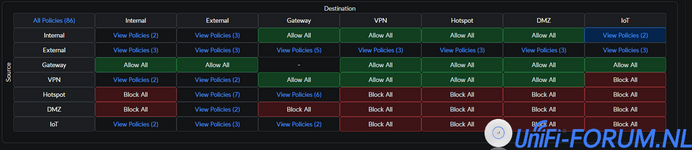

Maakt deze update het makkelijker om een blokkeer regel te maken voor een bijv gasten netwerk?Inmiddels IoT in een aparte zone, wat het een en ander simpeler te beheersen maakt.
Bekijk bijlage 10345
en dan een allow voor DNS 53
Dat ziet er uit als een zeer overzichtelijke FW rules matrix. Dank voor het delen.Inmiddels IoT in een aparte zone, wat het een en ander simpeler te beheersen maakt.
Bekijk bijlage 10345
UDM Pro: 4.1.9
Network: 8.6.9 en gisteren naar Network: 9.0.92
werk mijn VPN L2TP en OpenVPN niet meer.
vandaag met wireshark aan de gang gegaan, welke wel gewoon functioneerd.
vervolgens alle vpn server config weg gehaald, opnieuw opgezet, maar op geen manier L2TP en OpenVPN werkend te krijgen.
Iemand ervaring hiermee?

Config staat klaar, maar disabled aan UniFi kant en enable ik wanneer nodig.
Teleport is in alle andere gevallen inderdaad veel handiger, losse WireGuard eigenlijk nooit gebruikt.

Idd BeeVPN.Gebruik je hiervoor BeeVPN op de Apple TV of een andere client app?
Het eerste wat ik tegenkwam, is het ontbreken van IP Groups op basis waarvan ik mijn UDM-SE firewall regels heb ingericht. De firewall van mijn UDM-SE heb ik destijds ingesteld op basis van deze video tutorial van Chris van Crosstalk Solutions uit deze serie.
Alle firewall instellingen zijn voor alle opvolgende UNA-versies gelijk gebleven en gemigreerd.
Huidige IP Groups:
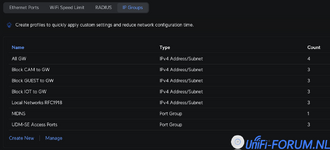
Welke consequenties zal dit hebben als ik de UDM-SE overzet naar de nieuw UNA 9.0.92 en vervolgens migreer naar de nieuwste Zone-Based Firewall?
Maar een heleboel regels zullen na conversie waarschijnlijk niet meer nodig zijn. Je moet je er wel op voorbereiden dat je na de conversie naar Zone firewall een review van al je firewalls regels zult moeten doen.
Om op mijn UDR een pre-test te doen, zou ik graag mijn UDM-SE firewalls willen exporteren en importeren in mijn UDR.
Heb het UniFi GPT al even gevraagd.
Als zowel mijn UDM-SE alsook mijn UDR gelijk zijn qua UniFi OS / UNA is dit dan überhaupt een mogelijkheid die software-technisch mogelijk is?
UniFi GPT
Steps to Export Firewall Rules in UniFi
Unfortunately, UniFi does not provide a direct method to export firewall rules through the user interface. However, you can manually back up your UniFi Network Application settings, which include firewall rules, and then restore them on another UniFi Network Application instance. Here’s how you can do it:
Backup UniFi Network Application Settings
- Access the UniFi Network Application:
- Open your web browser and log in to your UniFi Network Application.
- Navigate to Settings:
- Click on the Settings icon (gear icon) in the lower-left corner.
- Go to System Settings:
- In the Settings menu, select System.
- Create a Backup:
- Scroll down to the Backup section.
- Click on Download Backup to create a backup file of your current settings, including firewall rules.
Restore UniFi Network Application Settings
- Access the Target UniFi Network Application:
- Open your web browser and log in to the UniFi Network Application where you want to import the settings.
- Navigate to Settings:
- Click on the Settings icon (gear icon) in the lower-left corner.
- Go to System Settings:
- In the Settings menu, select System.
- Restore from Backup:
- Scroll down to the Restore section.
- Click on Upload Backup and select the backup file you previously downloaded.
- Follow the prompts to restore the settings, including firewall rules.
Additional Considerations
For more detailed information on managing firewall rules and other settings, you can refer to the Traffic Management in UniFi article.
- Manual Documentation: If you need to document your firewall rules, you can manually copy the rules from the UniFi Network Application interface and save them in a text or spreadsheet file.
- API Access: For advanced users, you can use the UniFi API to programmatically retrieve and export firewall rules. This requires knowledge of API usage and scripting.
Related articles:
- Windows Firewall Rules for UniFi Network: This article explains configuring Windows Firewall to allow Java programs for a self-hosted UniFi Network Server on Windows.
- Zone-Based Firewalls in UniFi: This article explains UniFi's Zone-Based Firewalling, which groups network interfaces into zones, simplifying traffic control and enhancing security.
- Traffic Management in UniFi: This article highlights UniFi's traffic management features like advanced firewalling, application filtering, policy-based routing, QoS, and ACLs.
Vergelijkbare onderwerpen

- Reacties
- 0
- Weergaven
- 282
- Reacties
- 0
- Weergaven
- 133
- Reacties
- 0
- Weergaven
- 217
- Reacties
- 0
- Weergaven
- 344
- Reacties
- 1
- Weergaven
- 336

Over ons
Het Nederlandse Unifi Forum is het onofficiële forum voor UniFi liefhebbers. Sinds de start op 4 januari 2018 bieden we een fris en overzichtelijk platform met handige functies, een responsief design voor mobiel gebruik, tutorials en handleidingen.
Ons forum is gebaseerd op XenForo-software en bevat een Resources sectie waar gebruikers content kunnen delen en beoordelen. Op UniFi Forum blijf je altijd op de hoogte van het laatste UniFi nieuws, aankondigingen en productveiligheidsupdates. We voegen regelmatig nuttige functies toe, terwijl het forum overzichtelijk en goed gemodereerd blijft.
Disclaimer:
Dit forum is op geen enkele manier verbonden met Ubiquiti of het merk UniFi. Alle vermeldingen van producten of merken zijn uitsluitend bedoeld voor discussie en informatieve doeleinden.